Google Mail Fail

Found an interesting header when doing some tests with mail filtering:

Received: from qb-out-1314.google.com ([172.21.30.5])
        by mx.google.com with ESMTP id k29si2692710qba.7.2008.09.06.14.48.05;
        Sat, 06 Sep 2008 14:48:06 -0700 (PDT)
Received-SPF: softfail (google.com: domain of transitioning user@example.com does not designate 172.21.30.5 as permitted sender) client-ip=172.21.30.5;
Authentication-Results: mx.google.com; spf=softfail (google.com: domain of transitioning user@example.com does not designate 172.21.30.5 as permitted sender) smtp.mail=user@domain.tld
Received: by qb-out-1314.google.com with SMTP id d5so1543676qbd.6
        for <destination@example.com>; Sat, 06 Sep 2008 14:48:04 -0700 (PDT)

See the problem? Look closely. In particular look at this line:

Received-SPF: softfail (google.com: domain of transitioning user@example.com does not designate 172.21.30.5 as permitted sender) client-ip=172.21.30.5;

Look at that IP. RFC 1918 states the “20-bit block” (172.16/12) is for private internets. Google is softfailing emails because it’s sent through it’s own mail servers. Google’s own SPF record looks like this:

;; QUESTION SECTION:
;_spf.google.com.               IN      TXT

;; ANSWER SECTION:
_spf.google.com.        292     IN      TXT     "v=spf1 ip4:216.239.32.0/19 ip4:64.233.160.0/19 ip4:66.249.80.0/20 ip4:72.14.192.0/18 ip4:209.85.128.0/17 ip4:66.102.0.0/20 ip4:74.125.0.0/16 ip4:64.18.0.0/20 ip4:207.126.144.0/20 ?all"

I really don’t understand why Google is doing this. They should have their SPF checker whitelisting mail sent from their own servers. SPF is intended to verify the sender. When sent locally it’s pointless and can only be harmful. They can still do other spam checks.

From what I can tell, this seems to happening about 50% of the time, meaning this is something deployed on some but not all Google clusters.

Nobody Is Using IPv6

Arbor Networks found that almost nobody is using IPv6 (a peak of 0.012% to be exact). Not exactly shocking.

This is due to a chicken or the egg problem:

  • ISP’s don’t give out IPv6 addresses because the majority of their customers can’t handle it. Modern operating systems support IPv6, but these days most people use broadband routers, which only support IPv4. As a result most can’t use IPv6.
  • Hardware vendors that make routers and switches often don’t support IPv6 to keep costs low, and performance high. It’s not needed since most ISP’s don’t support it anyway, and that doesn’t look like it’s about to change anytime soon.

There are however a few ISP’s that have experimented with IPv6.

Of course another issue is that most websites don’t use IPv6, but I think that’s the easiest to fix. Since most servers are hosted in data centers with expensive routers that could be upgraded. Nobody bothers because it’s not much more than a novelty. Servers themselves use modern operating systems that can easily support IPv6.

So what will change this? A massive government push. Something along the lines of Digital TV transition. It would need to do the following:

  • Specify a date after which all hardware and software sold must be IPv6 compatible.
  • Specify a date after which all ISP’s with more than X customers, or a certain bandwidth level must support IPv6.

Unlike the Digital TV transition, there’s no real push to kill IPv4, so it wouldn’t be so bad if it died a natural death like Gopher and just became antiquated and disappeared. DTV is different since the space freed up can be auctioned for large sums of money, which is the real incentive for the switch anyway.

Will it happen? I doubt it.

The Olympics is available via IPv6 (more info here). China has a better IPv6 plan since their growing population means they see the need for more IP space. Not to mention the US has a much higher allocation than China.

The DoD as well as the US Government in general has been moving to IPv6, but they have yet to make any real push for the private sector.

Until the US Government realizes a push is necessary it’s not going to happen. To bad. I’d love to point a domain name at a toaster. I’d love even more to get rid of NATs, since they are a nightmare for software to work with.

WMM Slowdown

I turned on Wireless Multimedia (WMM) support the other day on my wireless network, figuring QoS for a wireless network would pretty much be a slam dunk. For those who don’t know, the four access categories it uses are:

  • voice
  • video
  • best effort
  • background

I was surprised to find, at least with the Netopia box that this actually resulted in a significant slowdown in http traffic, even when there was no other services being used. To put some numbers out there, we’re talking 10000 kbps with it enabled vs. 17400 kbps when disabled (these aren’t scientific, they are just bandwidth tests). I think the performance hit negated any real benefit, at least in this case. The box doesn’t handle much VoIP, so it really doesn’t do much. Video is more about raw bandwidth these days than latency thanks to CDN’s becoming more common and reducing the bulk of the latency issue. Also interesting is that the CPU hit seems pretty minimal. Daily average increased from 2% to about 4%, it’s double but really nothing serious. With it enabled it never spiked past 50%, and that was only one time.

So after a few days testing, WWM is turned off. Seems QoS at least in this case doesn’t pay. I can’t complain, wireless performance (20Mbps+) and signal strength are fantastic (when the microwave isn’t on) for an 802.11g network. Despite that, there’s always the desire to find ways to make it even better. Next step would be 802.11n, but I have a thing against uncertified gear. Once it’s standardized, I’d strongly consider it, especially if I can find a device that supports Linux firmware.

Experiment complete.

Goodbye MRTG

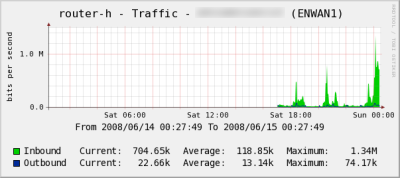
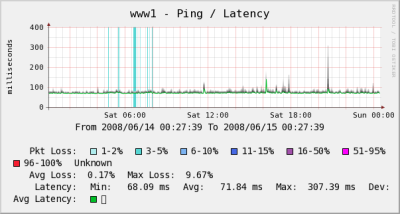
I’ve finally got just about all the network graphs I maintain using RRDtool rather than MRTG. I started doing this since MRTG isn’t good for graphing things with more than 2 sets of numbers. I started doing this because I wanted to track cable modem data. I figured while I’m at it, I should move other stuff too.

So much easier to read, and so much faster since your not spitting out graphics files every time the system polls. Not to mention the quality of the graphing image is much nicer. These are shrunk a little and they still look great.

Traffic

Ping

MRTG is still running, but I think I’ll shut it down as soon as I can verify things are working the way I want.

The $500 Ethernet Cable

I’ve seen this in several sites over the past few days. Apparently Denon decided to put out a $500 Ethernet Cable (AK-DL1). Free shipping via Amazon. I’ll give you few minutes to laugh.

Hopefully your now under control. As pointed out in various places like Slashdot and all the links in the paragraph above, the only thing possibly unique to this cable is a thin piece of foil. Considering it’s use, that likely has no material difference. Someone will still purchase it despite a variety of cables that are almost unquestionably of equal or greater quality and cost less than 1% of that one.

I’m convinced cabling is the biggest scam in the electronics industry today. It amazes me that the “pros” use $5-$25 generic cables while the novices spend hundreds on gold plated, shielded, USB, speaker, ethernet cables. For some reason USB seem to be the most abused (though never to the $500 level). HDMI is expensive to begin with, so while it’s still abused, percentage wise it doesn’t seem to be to the same degree. Not exactly sure why, but even SCSI was never subjected to this level of price variation.

This reminds me of the coat hanger cable experiment a little while back (among others). A modern classic.

It’s a sad state of affairs that you can’t just walk into a store and by a reasonably priced good quality cable these days.

A few months ago I ordered a USB cable where shipping cost more than the product. Still cheaper than going to the store. I should add that cable works perfectly. It’s actually better than anything I could get at a store since it didn’t come in one of those plastic packages that cut you when you open it (which should be outlawed by the way). Just a sealed plastic bag with a sticker on it.

USB, HDMI, speaker cables might be overpriced, but it’s nothing compared to the $500 Ethernet cable.

Edit [6/20/2008]: Network World has a nice rundown of it.

Cable Modem Power Level Graphing

As I hinted last week, I graph a fair amount of data, since I find it pretty handy at times, not to mention just interesting to see in a pretty graph form. I’ve been doing this for years and it’s served me well.

One thing I really wanted to get going was monitoring the cable modem’s power levels. This is now implemented:

Cable Modem Power Levels

How pretty is that? I also moved my ping/latency graphs away from MRTG to RRDTool based graphs. Next up is interface traffic (when I get around to figuring out why it didn’t work when I just tried it).

Poor Broadband Performance

For the past several weeks, the cable modem has been getting more and more unstable. Having dealt with this before I knew the signal quality was pretty poor from looking at the stats. By using a different line that goes more direct, it made a real difference as the data below shows (sidenote: I need to start tracking this using RRDtool).

Before

Forward Path:
Signal Acquired at 723.000 MHz
SNR: 27.1 dB
Received Signal Strength: -19.4 dBmV
Bit Error Rate: 0.459 %
Modulation: 256 QAM

Return Path:
Connection: Acquired
Frequency: 31.6 MHz
Power Level: 61.0 dBmV
Channel ID: 4
Modulation: 16 QAM

After

Forward Path:
Signal Acquired at 723.000 MHz
SNR: 37.1 dB
Received Signal Strength: -6.9 dBmV
Bit Error Rate: 0.000 %
Modulation: 256 QAM 

Return Path:
Connection: Acquired
Frequency: 31.6 MHz
Power Level: 49.8 dBmV
Channel ID: 4
Modulation: 16 QAM

The performance before was getting pretty bad (never more than 10Mbps, often below 4Mbps). Just ran another test and got this:

Comcast Speed

You can see the packet loss was at 100% for several hours yesterday, and was even when up the connection was pretty poor. Around 3:00 it was disconnected while they fixed the coax hookup. You can see the clean connection afterward, with only one small hiccup while I made a little adjustment to the networking cabling that resulted in a few minutes down.
Packet Loss

Pings to this server are still a little high after the tornado incident due to some weird routing on Comcast’s part. Not sure when will get resolved.

Strange Population Statistics

Yesterday the estimated world population passed 6,666,666,666. Interesting (though just coincidence) the estimated number of available IPv4 addresses was supposed to pass 666,666,666. Perhaps we are the beast?

An interesting thing to note is that the population is increasing at a very rapid rate. How long it’s sustainable before a Malthusian catastrophe is subject to debate. Some say the industrial age freed us of that pending disaster, others say that just bought a little more time. By about 2024 there is expected to be 8 billion people. IPv6 can’t come soon enough

[Hat Tip: Slashdot]

Slow Site

Last Friday (May 2), the data center where this site lives suffered a power fluctuation due to some tornado activity in the area. The actual outage (if there was even one) seemed to have been in the 5 minute ballpark based on various monitors. Apparently this somehow resulted in a routing problem resulting in some lag and packet loss for some (including myself). Possibly a router that didn’t persist as well as one would hope. This is being investigated.

As a result, if this site (and it’s feed) seems slower than normal, that’s the reason.

Accepting Less Than 99.999% Uptime

The Standard has a good writeup on how we accept less than stellar uptime for things that are becoming more and more valuable such as broadband.

Phone service is reliable because it’s mandated to be. There’s pretty strict rules regarding uptime. As a result it’s pretty good. The reason for this is that phones are used for emergencies (911). But what about VoIP?

It makes you wonder why broadband access isn’t being held to these standards. Of course the answer is “money”. But should it be changed? Should ISP’s need to ensure connectivity is as reliable as old POTS lines? I suspect for people to ditch POTS, it will need to be.

I wonder if FiOS is held to the same 99.999% uptime requirements when it’s run by the phone company, and used for VoIP. I doubt it, but I’m not sure.

I suspect reliability of broadband will become more of an issue as VoIP interest increases in the next 18-24 months and larger players like Verizon and Comcast start pushing it to even more homes.