Firefox Home: Adults Only

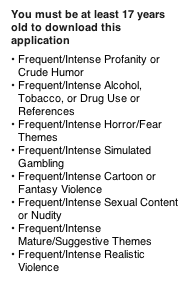
Firefox Home iTunes WarningApple posted the Firefox Home application, which complies with Apple’s policies by using WebKit as opposed to Gecko. Regardless, for whatever reason Apple feels that Firefox Home is a NC-17 application.

Presumably the reasoning behind this is that since a web browser can view anything on the internet and 12% of it is porn among other things out there.

If Apple really feels the Firefox Home app is dangerous, why doesn’t it update Safari so that it warns people of the risks before first use? Presumably a fair amount of iPhone users are under 17 and potentially unaware of the risks. Should parents be warned in the store? Safari is a default app and included in every iPhone that ships.

Other web browsers like Opera and Perfect Browser have the same restriction but much less verbose warnings (only “Frequent/Intense Mature/Suggestive Themes”). At least two others, iCab Mobile and Browser has the same warnings as Firefox. Apple isn’t very consistent.

Meanwhile the Twitter app (formerly Tweetie) will let you “follow” porn starts who will provide services if a particular team won the world cup. It also embeds a web browser that will go to links in tweets regardless of content. That app is rated 4+.

This strikes me as inconsistent and unnecessary.

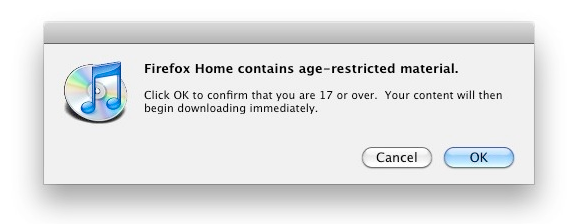
Edit: This is the dialog presented when you try and download it. This must be one hardcore app:

iTunes Firefox Warning Dialog

WebM

In August 2009 after the On2 announcement, I suggested that Google might open source a codec in hopes of derailing OGG which it feels is inferior as well as h.264 which is patent-encumbered. Google took VP8, the successor to the popular VP7 codec and started The WebM Project. To quote the project page:

WebM is an open, royalty-free, media file format designed for the web.

WebM defines the file container structure, video and audio formats. WebM files consist of video streams compressed with the VP8 video codec and audio streams compressed with the Vorbis audio codec. The WebM file structure is based on the Matroska container.

Google describes the license as “BSD-style”. A very good move since it’s liberal enough to encourage widespread open and proprietary inclusion. GPL is to viral for some potential adopters.

Software Support

For the browser side, Chromium and Firefox Nightly builds support WebM starting today. Opera and Google Chrome to come shortly.

Google also created patches against FFmpeg for encode as well as decode and created DirectShow filters which are available for download. I suspect by way of libavcodec we’ll see support in lots of other products in the near future.

Microsoft will support VP8 in Internet Explorer 9 if you have the VP8 codec installed. Not quite “support”, but better than nothing.

Adobe is also supporting VP8 in Flash, which means content producers can eventually kill VP7 and VP6 encoding and use VP8 to reach most of their audience. This is very important as encoding videos into several formats is costly and time consuming (I know this very well).

Hardware Support

Google has already said they are working with video and silicon vendors to add VP8 hardware acceleration to their chipsets. I suspect newer phones in the near future will be supporting it. Especially if they run Android.

Content

Google is supporting WebM in the HTML5 test for YouTube which I mentioned a few months ago. I suspect we’ll see lots more support in the very near future.

Supporters

Even more telling of the potential than the above is the list of supporters which contains some big names who can put a lot of weight behind hardware/software/content support. AMD (who owns ATI), NVIDIA, Marvell (lots of mobile chipsets), Qualcomm (think mobile chipsets), TI, Broadcom, ARM on the hardware side alone is impressive. If the majority of them add hardware support to their upcoming offerings, that will be game changing. On the software side leaves 1.5 holdouts in the web video world: Apple (1) and Microsoft (0.5).

This is a game changer.

YouTube HTML5 + Firefox

Google has been a long time supporter of HTML5. They recently launched a HTML5 beta of YouTube however it will only work in Safari and Chrome. The reason for this is not due to the actual markup but the video codec chosen. YouTube is using h.264, the same codec used for YouTube HD via Flash. This works in Safari and Chrome because Safari uses QuickTime to render <video/> and Google licensed h.264 for Chrome. Firefox however doesn’t include the proprietary codec for licensing reasons. It’s not a matter of cost but principle.

IE is supported through “Chrome Frame” which is essentially the Chrome browser in IE’s chrome. Your really just browsing the YouTube site with Chrome. Google could use this as a way to get people away from Flash and IE and onto Chrome one way or another.

I discussed the h.264 debate in more depth a few months ago.

You have to wonder why we don’t want anything proprietary slipping into HTML5, or want proprietary image formats (GIF turned us off to that) but exceptions are made for video.

Edit 1/23/2010: More on the topic:

Edit 5/21/2010: Thoughts on WebM.

Things You’ll Love About Firefox 3.6

To be honest Firefox 3.6 is a little lighter on Features than Firefox 3.5. It’s more about refining and improving than bells and whistles. Here are the things I feel are really noteworthy.

User Centric Features

UI Speed – Many things in the Firefox 3.6 UI have gotten faster. For example startup time has been improved thanks to various optimizations. My personal favorite is the awesomebar is now asynchronous, if you don’t know what that means, just trust me that it makes things feel faster if you have a slow hard drive like in a laptop.

JS/Video Speed Improvements – TraceMonkey, the fast JS engine has gotten some tweaks to improve performance even further. Seeking in <video/> is now much faster than it was in Firefox 3.5.

Focus – UI geeks will note that Firefox has had a few issues regarding focusing elements. Thanks to some refactoring it’s vastly simplified and improved.

Personas – Firefox has always supported theming, but it’s a complex process to build a theme and it’s prone to breaking as the UI evolves between versions. Personas is a light weight system to customize the look of the browser’s chrome.

Plugin Update Notification – A big cause of Firefox crashes, and security issues actually aren’t related to Firefox directly but plugins. Firefox can now notify you when you need to update a plugin helping you to keep your system as stable and secure as possible.

Full Screen For <video/> – Firefox can play native <video/> but thus far had no method to go full screen. Apple may want you to pay for “Pro” for full screen but with Firefox 3.6 you get it at no extra charge.

DLL Blacklist – To improve security/stability Firefox now has a DLL blacklist and can prevent other DLL’s from interfering with Firefox. This is Windows only at this time.

Opening Links In New Tab Position – When you opened a link in a new tab in previous versions it opened in a new tab on the far right, with lots of tabs open this created confusion as you may have several different tabs open on various things your doing. Now this will result in the new tab being created to the right of the current tab. If you don’t like this behavior you can set tabs.insertRelatedAfterCurrent to false. It takes a little getting used to, but it’s worth it.

For Developers

-moz-background-sizeThis is exactly what it sounds like. I’ve wanted to do this a few times in the past.

Poster frame for <video/>Poster frames are now supported for <video/>. It’s a small bit of polish but will hopefully benefit design and perhaps even SEO down the line.

Web Open Font Format (WOFF) – Imagine an open font format that supported compression and meta data. Now imagine that a lot of font foundries have expressed support for it. WOFF!

async attribute for <script/> – It’s simple enough, the async attribute is now supported. Those who care about performance have wanted this for a long time.

Using Files from Web ApplicationsThis is a huge step towards making web applications first class citizens. Hopefully we’ll see support for this in Google Docs at some point (one of the apps I think could best make use of this).

HTML5 Parser – Firefox 3.6 ships with an HTML5 parser, though it’s disabled for now by default. To enable set html5.enable to true.

The Jetpack Debate

I’ve generally found Jetpack to be pretty cool. It’s easier to develop and I’m fairly familiar with both “traditional” extension development and jQuery so it seems natural to me. However I generally agree with Daniel Glazman’s blog post on Jetpack. I’ll even agree that closures can make code more difficult to read, though I think I’ve mostly adapted to it at this point.

Jetpack reminds me more of building JS “widgets” than extensions. I’m not sure I see the advantage of moving away from XUL which really isn’t “hard” for 98% of things (though XUL <wizard/> has admittedly made me say WTF a few times) to HTML unless some sort of portability were gained, but that doesn’t seem very likely at least right now. I haven’t seen any indication of intent either. XUL has the advantage of making good UI seemingly easy while HTML really doesn’t, though I’ll admit HTML5 is changing that.

The biggest problem I see with Jetpack is that too much of it is designed around existing needs. The problem with this process is that it’s always playing catch-up. The best extensions are disruptive and do things nobody ever thought of, or even thought possible. Looking at the Jetpack JEP list I see pagemods and toolbar. The kicker is these are “implementing” and “planning” respectively right now.

Things like jetpack.slideBar, jetpack.music and especially jetpack.lib.twitter make me feel a bit concerned. Why? Because they encourage too much conformity, and too many twitter client Jetpacks.

When developers are given such a sterile environment that’s intended to promote experience and stability it ends up inadvertently creating monotony and stalling innovation. If you want proof look at the iPhone. There are indeed some great apps and I say that as an iPhone user myself, but for each great application there are 1,000 that aren’t worth the price (which is often free). Many are just cookie cutter apps with a companies logo on them. Google used one undocumented API for a feature Apple didn’t think of providing a documented API for, and it was news worthy. While Jetpack distribution isn’t limited in the same way that iPhone apps are with the App Store the design questions still remain.

To quote Adblock Plus author Wladimir Palant:

…Jetpack has to support Adblock Plus, not the other way around. As it is now, Jetpack isn’t suitable for complicated extensions.

That’s the wrong order.

5 Years Already?

Has it been 5 years already? The landscape has certainly changed since 2004.

I think it’s finally accepted that something can fight back against Microsoft. Size doesn’t guarantee market share on the Internet. In the pre-www world you had to convince a few managers to buy your product and you can be installed on 10k systems. Home users typically used what they knew from work. In 2009 even offices are becoming more accustomed to letting employees use what they feel works best (though not all there yet, easier system re-imaging is helping here). Home users put whatever they want on their computer. The focus is clearly shifting more and more towards the user and making their experience better.

Where will things be in another 5 years?

Plugin Check

Mozilla’s Plugin Check just launched. Considering 30% of Firefox crashes are plugin related, and they are often the source of security issues, it’s worth making sure you’re up to date.

It’s pretty simple to use. Just visit the page, and update the plugins that need to be updated. At the end of the day you want to see a string of green like this:

Plugin Check

An easy step for a faster, more stable, and most importantly more secure web browsing experience.