On Square Skimmer Security Risks

There’s an “open letter” going around about the alleged security hole created by SquareUp, a startup that gives out free credit card readers for smart phones. To quote the meat of it:

In less than an hour, any reasonably skilled programmer can write an application that will “skim” – or steal – a consumer’s financial and personal information right off the card utilizing an easily obtained Square card reader. How do we know? We did it. Tested on sample Square card readers with our own personal credit cards, we wrote an application in less than an hour that did exactly this.

Allow me to debunk the hell out of this:

  • To skim a card you need physical possession of the card. The numbers are printed on the front. No reader needed.
  • Skimming is normally done by attaching a device in front of a legitimate reader (such as an ATM) so it passively collects data. Not via cell phone. Stealing a credit card, walking to a back ally and skimming doesn’t make any sense.
  • Credit cards numbers are worth almost nothing on the black market. They are sold in bulk. This process is to slow to be viable for even the most brain-dead of criminals to want to bother with.
  • There are easier methods than the above including phishing attacks, becoming a waiter (the best job for credit card thieves), or just hacking one of the many insecure ecommerce sites on the net. An ATM skimmer attached to an ATM is much more profitable and harder to get caught since you can leave and come back later.
  • Square’s dongle doesn’t encrypt data because it goes directly to the phone. You’d need to extensively modify the device to intercept anything. The connection from your phone to Square seems to be encrypted.
  • Oh yea… They have their logo on top, but never link to their homepage or explain who they are. VeriFone is a vendor of credit card scanners. A direct competitor of Square. They also sell wireless scanners that would compete directly with Square. They cost a lot.

How’d I do?

Bonus:

VeriFone sells “contactless” point of sale systems. I’ve mentioned several times over the past few years how poorly thought out these seem to be. WREG recently did a great story on how easy it is to scan/clone one of these cards to a hotel key (full disclosure: WREG is an affiliate of my employer).

Conclusion:

If someone steals your credit card swiping it on their own scanner, reads the numbers off, or just running to the nearest store and buying things, it doesn’t make a difference. Square isn’t the security hole here.

I’ve got a square reader on hand and can say it’s cheaply made (obviously), but no reason at all to think it’s any less secure than any other terminal. The owner/operator of the terminal is the chief point of failure.

Building A PC Headset Adapter For IP Phones

Building a PC headset adapter for a Nortel 1120E actually turned out to be dead simple. The headset port is actually a pretty standard 4P4C port (also known as RJ9 or RJ10 apparently). For about $5 I was able to put together a fully working adapter to use any standard PC headset.

I suspect this will work just fine with most phones even non-IP phones however your mileage may vary. Obviously this is at your own risk.

Parts:

If you have an cable from a phone receiver you could easily reuse that, just cut one end. Those are just 4P4C cables.

The stereo connection jacks are rated 5,000 cycles, though they feel a little flimsy to me. For the price however they or not bad, just proceed with caution. If you build this and intend to plug/unplug often you may want to consider another one. For me, if they break I’ll swap them out.

I was originally going to solder and tape it up to save space rather than use a board. The board was for prototyping and I’d just reuse it for something else later. At least for now however I’ll just leave it all taped to the board, it seems pretty stable if you leave the headset plugged in. I just taped it to the base of my monitor. I really wanted a breadboard, but there were surprisingly none in stock at RadioShack. No breadboards at RadioShack is like a McDonald’s without burgers. The PC board however worked for the task.

Pinning

To summarize how it’s connected, a 4P4C cable has two conductors for speaker and two for microphone. It’s simply a matter of connecting them to the correlating jack with the correct polarity and you’re done. The following diagram (from Wikipedia) illustrates the pinning:
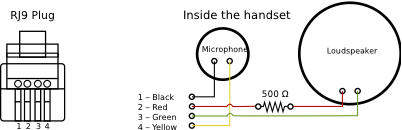
4P4C Pinning

On the SJ1-3523NG jacks, this corresponds as follows:

Audio out:
  Pin | Wire
    3 | Green
    2 | Red
Audio in:
  Pin | Wire
    1 | Black
    3 | Yellow

A little testing showed that the presence of a microphone is how the Nortel 1120E can tell if the port is connected or not. That means you can’t just use the headphone for example to listen in on a call. A microphone must be connected (muting works fine however).

Final Product

I grabbed a Logitech ClearChat Style Headset which retails for under $20. Works perfect for the task and has inline controls for easy mute/volume control.

As a result I put this together using only a few dollars of parts and using only tools found in my cube (wire strippers, wire cutters, scissors).

There you have it. It only costs a few dollars and is dead simple to wire. Now I can code while on calls without having to decide between speakerphone, which echos when several of us are on the same call or risk neck pain trying to balance a phone receiver.
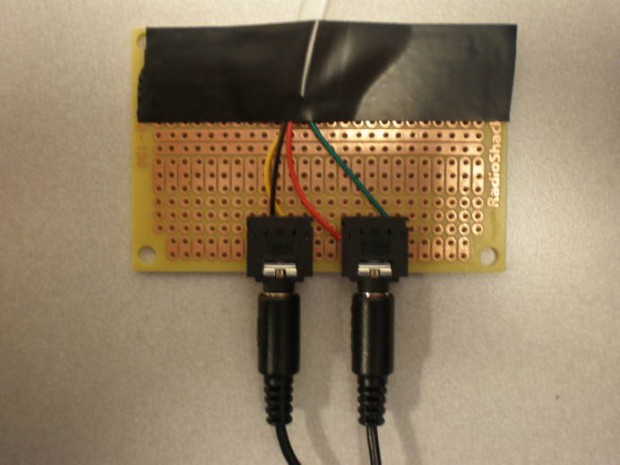
IP Phone Headset Adapter

In practice, I have tape holding the jacks to the board. I removed it for the photo shoot to better show how the wiring is done.

Email Alarm System

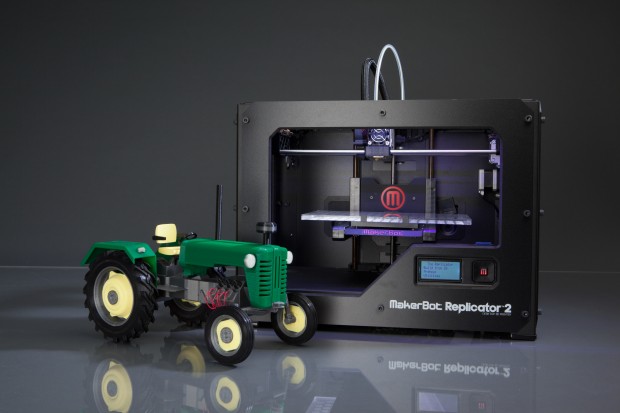
I’ve been in the mood for some hardware hacking for a while. Recently at work I thought it would be nice to have a way to know if an important (emergency) email came in that required attention. These fire-drills are just part of the job. I have multiple computers and screens so an on-screen alert isn’t always effective. Audible alerts don’t work either because speakers are only connected to one computer at a time and often headphones are plugged in. I need something more independent.

My solution was to build a USB alarm system: Two rotating LED lights to get attention visually as well as a 76 db piezo buzzer which chirps when the system is activates to help get attention. The buzzer only chirps and only when the system first invokes so it’s not an annoyance. It’s enough to get attention, but not enough to bother others. It has multiple chirps so that I can potentially setup multiple alert types.

Now we can really be on the ball!
P1 Bug Report Alarm
Obligatory goofy office signage

Continue reading

Apple To Use Micro USB?

I mentioned back in September 2007 that cell phone manufacturers were looking to replace their varied connectors with Micro USB meaning most cell phones would use the same chargers and accessories. MacRumors points to a Reuters report that Apple has also agreed to go Micro USB in Europe, which presumably means the US as well.

I personally doubt Apple will just ditch the 30 pin dock connector in favor of Micro USB. I suspect Apple will either bundle a Dock to Micro USB adapter instead or add a Micro USB port next to the Dock connector. Among the many reasons:

  • The dock is essentially “USB+ Firewire + Audio + Video + other”. Take a look at the pinout. It’s much more complicated to get USB audio working than to read line out. For the intents and purposes the dock is as good if not better interface.
  • The dock connector has an extensive list of implementations including many accessories and car audio systems. “Designed for iPod/iPhone” is preferred by Apple over “Designed for mp3 players”.
  • The dock is a proprietary interface, Apple collects a licensing fee for its use in accessories.

Since the dock connector is really “USB+ Firewire + Audio + Video + Other”, a USB adapter is obviously cheap and easy to produce (they already ship a USB cable with all products). Hence I suspect there will be either a Micro USB adapter, or Apple will add the port to the bottom of the iPod/iPhone since Micro USB is very small.

There is still an advantage to having Micro USB. For one charging will become more universal across cellphones. This means car manufacturers, and even airplanes can offer Micro USB to let people charge phones easily via a single ubiquitous low powered interface.

It’s also more environmentally friendly since you’ll be able to buy your own separate higher quality power adapter. No more cheap bundled power bricks known for their phantom loads. Or just charge off your computer. You’ll also be able to use the same charger and accessories with more phones.

I’m glad to see this finally happening.

Edit [6/29/2009 @ 10:00 PM EST]: Pocket-lint says Apple stated to them it will be an adapter.

Cheap Tiny PC’s

Paul Stamatiou has a great blog post on the DIY $200 PC. Premise is that for $200 (or possibly less depend on your requirements) you could put together a little PC for some purpose. The core of this being affordable is the new-ish Intel D201GLY2 Motherboard/Processor combo.

The only problem I see with it is the board surprisingly uses an SiS964 Southbridge, which for the moment doesn’t seem to be well supported under Linux from what I can tell. That could make use a little more complicated, though I can see that changing relatively quick. I wouldn’t run a modern version of Windows on something like that, not to mention Windows would cost about as much as the hardware. It is a Celeron, but it’s 64bit.

This means for approximately $200 you can put together a very low power, quiet (could even be fanless) computer/device/server/appliance for whatever purpose you wish. A little work and it would make a great file server. Add a better NIC and you’d have a great firewall. Hook it up with some WiFi and it can easily get on a network from anywhere. There’s a ton of possibilities here. It could be a lot of fun to build something out of it. I’m not sure using something like MythTV will work to well, at least now.

Very cool stuff. I’m interested what people will do with it.

Micro USB For Cell Phones

Replacing a cell phone is one of the most insane upgrades ever. Not only do you replace the device (often with a new service plan for 2 years), but you’ve got to replace accessories in most cases, especially if you change manufacturers. Sometimes even the same manufacturer can have different connectors for the same accessories, depending on the phone model. Lets not forget the cost of these accessories. It’s a silly process. At least with computers most of your accessories plug in fine provided they are remotely modern (made within the past 4 years).

Several manufacturers including Nokia, Samsung, Motorola, Sony Ericsson and LG have now standardized on Micro USB meaning that future phones will use the same connection. Not only that, but it’s USB, so just like your computer. A few cell phones currently use Mini USB (such as Motorola cell phones). Micro USB is even smaller, which should be sufficient for a few years until cell phones become no more than a piece of paper. You can see a picture of various USB sizes here. Advantages of using USB rather than another standard include that it’s powered (meaning you can charge with it), is compatible with virtually all PC’s (meaning you’ll be able to charge your cell phone from your PC, or even transfer data if your cell phone’s software allows), and it’s pretty fast.

Having one standard means that like we see for Bluetooth devices, there will be a ton of options for consumers to choose between. Not just 1 data cable, a handful of charger, etc.

Of course that means pretty much everyone will need to buy Cell Phone accessories at least one more time. But hopefully when you do, you’ll buy ones that last.