Many users just open Firefox and start browsing the web. What they don’t know is that you have a fair amount of control over your browser. Go into the “Toolsâ€? menu and select “Optionsâ€?. From there you can choose what you want to do tweak. Some that may be of interest are below:
Start Page
What do you want to see when you start Firefox? You can choose what you want by going into Options and selecting the “Mainâ€? tab. The top part lets you pick the page you want to see. Could be your employer, favorite search engine, or nothing.
Open in New Tab
Like tabbed browsing? Hate new windows? Go into Options and selecting the “Tabs” tab. Select “a new tab” where asked how new windows should be opened. That will reduce the window clutter on your computer.
Disable Password Manager
Don’t like being asked if Firefox can remember your password? For some users this is a great feature, for some it’s undesired and possibly annoying. Just go into Options and select the “Security” tab. Uncheck “Remember passwords for sites”.
The land of a million prefs
Hungry for more prefs? No problem. In a browser window enter the following URL (and nothing else): “about:config”. You’ll be presented with hundreds of options you can tweak. Warning: this is not for amateur use and could cause problems if handled incorrectly. Make sure you are willing to bail yourself out if you start changing things.
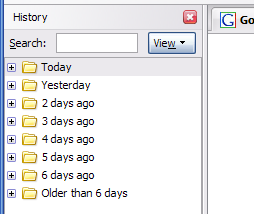 Remember that website you were at a few days ago? That really interesting one… you know. Forgot? We all do. The internet has many interesting pages. Thankfully that’s not such a big problem. Go to the “History” menu and select “Show in Sidebar”. You’ll see a sidebar show up on the left side of your browser. Just click around to find the site you were at. You can search (somewhat basic, but can be helpful), or view by different criteria (sort by date, site, most visited, last visited). If you surf the web a bit, this list may be a bit large, but after doing this once or twice, you’ll find a strategy that matches your web browsing habits and learn to navigate it quicker and quicker. It’s a very worthwhile tool to master.