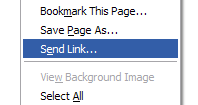
I’m pretty sure many ignore this handy feature. Find a page you want to share with a coworker, friend, family member? Simply right click on the page (or go to the “File” menu) and select “Send Link”. Firefox will create a new email with the title of the page you found and include the link in the body. Add your friend(s) email address and send it off. Sharing links is easy.
6 replies on “Firefox Tip: Send To A Friend”
Something I’ve often wondered: Couldn’t that thing have a better name? “Send Link” is pretty vague, where am I sending it to, a shortcut on the desktop? Wouldn’t something like “E-mail Link To…” be more descriptive?
I also agree with you “Toe”. It should reference the method for sending the link, email.
However, I actually cannot see a decent usage case personally for this. I’ve never used it apart from unintentionally clicking it instead of “Save Image As”.
Jon – I use it all the time.
That’s one of those strange things left in Firefox that I would like to be done away with. Everyone’s talking about making the UI lighter than Mozilla has been and Seamonkey is but this rarely used (yes I know, some people do use it, as some people used other things that got removed) item has stayed with us to this day.
i made a trivial extension for firefox ages ago to add this function as a toolbar button: Send Link button
Sounds like a great idea but when I click it nothing happens.